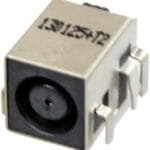
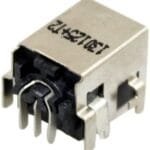
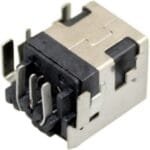
Home » Shop » Dell DC Power Jack Charging Port Connector Inspiron 24 7459 I7459 AIO Laptop Jack Charging Port

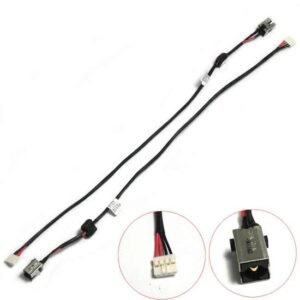
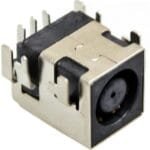
Dell DC Power Jack Charging Port Connector Inspiron 24 7459 I7459 AIO Laptop Jack Charging Port

799.00

Hurry, Limited Stock Available – Order Now!
FREE Delivery
Get GST TAX Invoice

Ask a Question

Error: Contact form not found.

Estimated Delivery:
02 July - 06 July
116 People viewing this product right now!
Guaranteed Safe Checkout Trues Badge
Need help? Chat on WhatsApp
Description

Dell DC In Power Jack Charging Port Socket Connector Inspiron 24 7459 I7459 AIO

Identifying symptoms of a faulty laptop power DC jack is crucial for maintaining the proper functioning of your device. Here are common signs that may indicate issues with the DC jack:

Intermittent Charging:
If your laptop charges intermittently or only when the power adapter is held at a specific angle, it suggests a loose or damaged DC jack connection.

Loose Power Connection:
A loose or wobbly power connection when the charger is plugged in can be a clear indicator of DC jack issues. The jack may no longer securely hold the power plug.

Power Cuts Out:
If the laptop frequently loses power even when the battery is charged, it could be due to a faulty DC jack disrupting the power supply.

Burning Smell:
A burning smell emanating from the laptop, especially near the power jack area, may indicate electrical issues and potential damage to the DC jack.

Visual Inspection:
Physically inspect the DC jack for any visible damage, such as bent or misaligned pins, or a cracked casing. Visual cues can provide insights into potential issues.

No Power:
If the laptop fails to power on even when the battery is charged, it may be a result of a faulty DC jack preventing the flow of power from the adapter.

Battery Not Charging:
When the laptop indicates that it’s not charging, despite being connected to the power adapter, it may signify a problem with the DC jack or the power supply connection.

Laptop Powers On Battery Only:
If the laptop only powers on when running on battery but not when connected to the power adapter, it suggests a potential issue with the DC jack or its connection to the motherboard.

Crackling Sounds:
Unusual sounds, such as crackling or sparking, may occur if there are electrical issues with the DC jack. Immediate attention is needed to avoid further damage.

Physical Damage:
Any visible physical damage to the power jack, such as a loose or broken casing, may contribute to its malfunction.

If you observe any of these symptoms, it is advisable to address the issue promptly to prevent further damage to the laptop and ensure a reliable power connection. Seeking professional assistance for DC jack repair or replacement is recommended for a comprehensive resolution.

Dell DC In Power Jack Charging Port Socket Connector Inspiron 24 7459 I7459 AIO

The laptop DC jack, also known as the power jack or charging port, is a critical component responsible for connecting the laptop to its power source. Here are key aspects of the laptop DC jack:

Purpose:
The DC jack serves as the interface through which the laptop connects to the power adapter, allowing the transfer of electrical power to charge the battery and power the device.

Location:
Typically located on the side or rear of the laptop, the DC jack is a small port where the power adapter’s plug is inserted.

Design:
The DC jack is designed to be durable and withstand the regular plugging and unplugging of the power adapter. However, due to its frequent use, it can be susceptible to wear and tear over time.

Connector Type:
The type of connector used in the DC jack varies among laptop models. Common connector types include barrel connectors and pin connectors.

Potential Issues:
Faults with the DC jack are common and may result from issues such as a loose connection, physical damage, or wear on internal components. These issues can impact the laptop’s ability to charge or power on.

Symptoms of Fault:
Symptoms of a faulty DC jack include intermittent charging, a loose power connection, power cuts, a burning smell near the jack, and difficulties in turning the laptop on.

Repair or Replacement:
If the DC jack is found to be faulty, it can often be repaired or replaced. Repairing may involve soldering or repositioning internal components, while replacement may require the installation of a new DC jack.

Preventive Measures:
To prolong the life of the DC jack, users should handle the power adapter and plug with care, avoid putting stress on the jack by pulling or tugging on the cord, and ensure proper alignment during insertion.

Professional Assistance:
If issues with the DC jack arise, seeking professional assistance is recommended for an accurate diagnosis and appropriate repair or replacement.

Understanding the importance of the laptop DC jack and being attentive to any signs of malfunction can help maintain the reliability of the laptop’s power supply and charging functionality.

Dell DC In Power Jack Charging Port Socket Connector Inspiron 24 7459 I7459 AIO
Additional information
In Box

1 Laptop DC Jack

Colour

Similar to Image

Warranty Summary

Testing Warranty Only Valid for 2 Days from the Date of Delivery

Image

All Pictures Shown Are For Illustration Purpose Only. Actual Product May Vary Due To Product Availability, Stock or Enhancement.

Special Instructions

Compare with your old Product or Part number to avoid Wrong purchase policy applicable

Reviews (0)
0 ★
0 Ratings
5 ★
0
4 ★
0
3 ★
0
2 ★
0
1 ★
0

There are no reviews yet.

Only logged in customers who have purchased this product may leave a review.

Warranty

Warranty Covered

This product is covered against manufacturing defects and functional failures arising during normal and intended use within the warranty period. Warranty service may include repair or replacement of the defective product or component, at the seller's discretion.

Warranty Not Covered

The warranty does not cover:

  • Accidental damage, abuse, or negligence
  • Burnt, cut, cracked, or physically damaged products
  • Damage caused by water, fire, power surges, or other external factors
  • Improper installation, misuse, or unauthorized repairs/modifications
  • Normal wear and tear due to regular usage
  • Consumable parts and accessories, unless found defective at the time of delivery
  • Products with removed, altered, or damaged serial numbers, warranty stickers, or labels
  • Products returned in a used, damaged, or incomplete condition

Warranty Service Type

To claim warranty service, customers must contact customer support and provide proof of purchase. If the product is found to be eligible for warranty service, the customer must send the product to our service center for inspection. Upon verification, the product will be repaired or replaced and shipped back to the customer. Customers are responsible for shipping charges incurred when sending the product to the service center, while return shipping will be borne by the seller unless otherwise specified.

Documents Required

  • Valid purchase invoice or order confirmation
  • Product serial number (if applicable)
  • Images or videos of the reported issue, if requested

Warranty Type

Seller Warranty

Important Note (Read)

Part Compatibility

Please note that multiple variations of this part may exist for the same model series. It is the buyer's responsibility to ensure that the part being ordered matches the one being replaced. We cannot be held responsible for orders placed incorrectly due to compatibility issues.

Need Help Choosing the Correct Part?

If you are unsure whether this is the correct part for your appliance, please contact us before placing your order. We are happy to assist and aim to respond within 24 business hours.

Product Information

Please note that this item is not an Original Equipment Manufacturer (OEM) part. It is a high-quality compatible replacement part manufactured by a third party and designed to fit and function like the original part for the specified models.

Please verify compatibility with your appliance before purchasing.

Return Policy for Incorrect item Order

If you discover that you have ordered the wrong part, you may return it subject to the following conditions:

  • A 20% restocking fee will be deducted from the refund amount.
  • The item must be returned unused and in the same condition in which it was received.
  • The part must retain our internal UV security marking, which is applied to all products for identification and warranty purposes.
  • Return shipping costs are the buyer's responsibility.
  • The item must be securely packaged to prevent damage during transit.
  • Returns that are damaged, used, altered, or missing the UV security marking may not be eligible for a refund.

Part Number Information

If you are ordering this item based on a part number, please note that the part number printed on the product you receive may differ from the part number you ordered. Many compatible replacement parts are manufactured with different printed part numbers while remaining fully compatible and functioning as direct replacements for the original part.

Returns or refund requests will not be accepted solely because the printed part number on the received product is different from the part number ordered, provided the supplied part is compatible with the specified model and performs the intended function.

We appreciate your understanding and encourage you to double-check your part number and compatibility before completing your purchase. If you have any questions, please contact us—we're always happy to help.

Recently Viewed

Scroll To Top
Close
Close
Close

My Cart