Home » Shop » Cooling Fan For Asus 13NB0FM0P01211 CPU VivoBook F510U S510U X510U S5100U

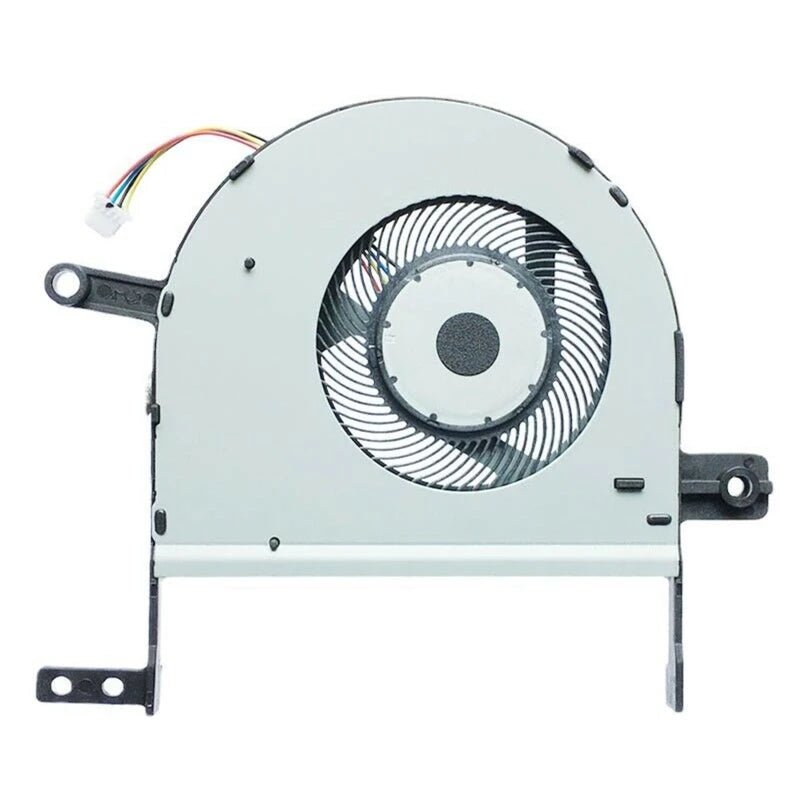
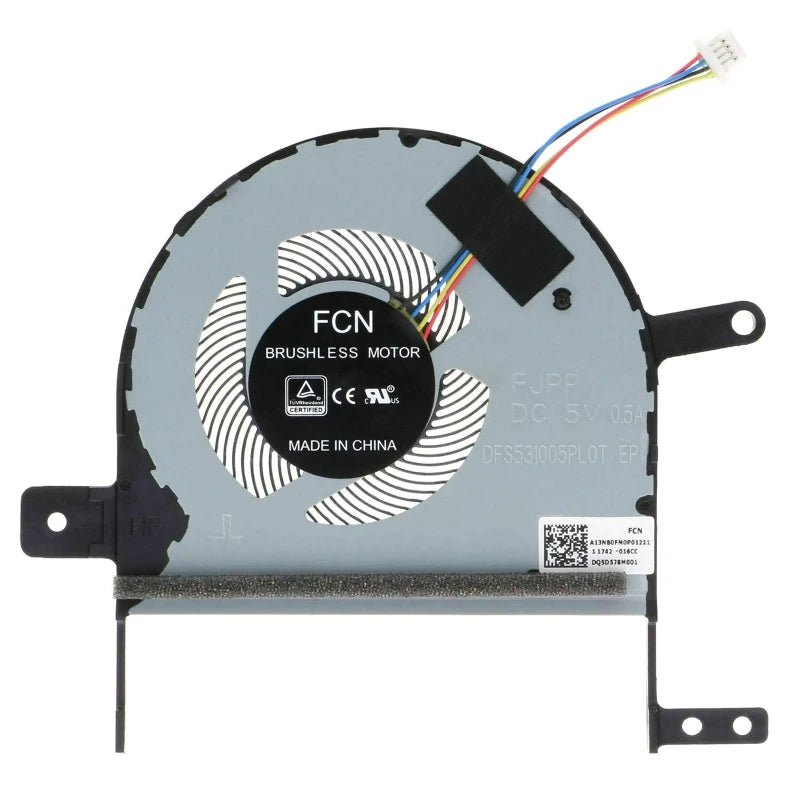
Cooling Fan For Asus 13NB0FM0P01211 CPU VivoBook F510U S510U X510U S5100U

899.00

Hurry, Limited Stock Available – Order Now!

Compatible Laptop Cooling Fan Cooler For Asus 13NB0FM0P01211 CPU VivoBook F510U S510U X510U S5100U

FREE Delivery
Get GST TAX Invoice

Ask a Question

Error: Contact form not found.

Estimated Delivery:
16 September - 20 September
101 People viewing this product right now!
Guaranteed Safe Checkout Trues Badge
LAPTOP PARTS FINDER

Check if this part fits your laptop

Select your exact laptop model to verify compatibility before ordering.

✓ Exact model matching✓ Compatible parts✓ Fast results
Description

Cooling Fan For Asus 13NB0FM0P01211 CPU VivoBook F510U S510U X510U S5100U

This replacement cooling fan is intended for compatible laptop models. Fan shape, mounting, connector and cooling assembly can vary between models.

Before ordering: Verify your exact laptop model using the compatibility finder on this page. Laptop series can contain different part configurations.

About Cooling Fan

A laptop cooling fan moves air through the cooling system to help remove heat from the CPU and other components.

Common Signs You May Need a Replacement

  • Fan making unusual noise
  • Fan not spinning
  • Laptop overheating
  • Thermal shutdowns
  • Poor cooling airflow

Product Description

Asus CPU Cooling Thermal Fan VivoBook S15 F510U F510UA S510U S510UA S510UF S510UQ X510U X510UA X510UN X510UQ S5100U S5100UQ DQ5D578M001 DFS531005PL0T-FJPP EG50040S1-CB60-S9A 13NB0FM0P01211

Recognizing symptoms of a faulty laptop fan is crucial for maintaining the health and performance of your device. Here are some signs that indicate it may be time for a laptop fan replacement:

Loud or Unusual Noises:
If you notice unusually loud or grinding noises emanating from your laptop, it could indicate an issue with the fan’s bearings. This may necessitate a replacement to avoid further damage.

Overheating Issues:
Persistent overheating and frequent thermal shutdowns are clear indicators of a malfunctioning fan. The fan’s primary role is to dissipate heat, and any failure in this function can lead to severe performance issues.

Inconsistent Performance:
If you experience unexpected performance drops or sluggishness, it might be linked to an overheating problem. A failing fan struggles to maintain the optimal temperature, affecting the laptop’s overall performance.

System Error Messages:
Some laptops provide error messages or alerts when they detect issues with the cooling system. Pay attention to any system notifications indicating a problem with the fan.

Visible Damage:
Physically inspect the fan vents for any visible damage, such as bent blades or blockages. Visible wear and tear are signs that the fan may be compromised and requires replacement.

Fan Not Spinning:
A fan that is not spinning at all is a clear indication of a malfunction. This can lead to severe overheating and potential damage to other internal components.

If you observe any of these symptoms, it’s advisable to consult a professional technician for a thorough assessment. Prompt replacement of a faulty laptop fan can prevent more significant issues and extend the overall lifespan of your device.

Asus CPU Cooling Thermal Fan VivoBook S15 F510U F510UA S510U S510UA S510UF S510UQ X510U X510UA X510UN X510UQ S5100U S5100UQ DQ5D578M001 DFS531005PL0T-FJPP EG50040S1-CB60-S9A 13NB0FM0P01211

The laptop fan plays a crucial role in maintaining the optimal temperature of your device, preventing overheating and ensuring peak performance. Over time, however, these fans can encounter issues that may necessitate attention. Here are common aspects associated with laptop fans:

Functionality:
The primary function of a laptop fan is to dissipate heat generated by the internal components, preventing overheating and potential damage.

Symptoms of Fault:
Unusual noises, such as grinding or loud whirring, may indicate issues with the fan’s bearings. Persistent overheating, inconsistent performance, and unexpected system shutdowns are also signs of a potential problem.

Causes of Issues:
Dust accumulation, worn-out bearings, or general wear and tear can contribute to fan malfunctions. Physical damage, such as bent blades or blockages, may also affect its performance.

Preventive Maintenance:
Regular cleaning of fan vents and keeping the laptop on flat, hard surfaces can prevent dust buildup and promote optimal airflow, reducing the strain on the fan.

Replacement:
If the fan is identified as faulty or damaged, timely replacement is crucial. Ignoring fan issues can lead to more significant problems, impacting the laptop’s overall functionality.

Professional Assessment:
If you observe any symptoms of a malfunctioning fan, it is advisable to consult a professional technician. They can conduct a thorough assessment, determine the extent of the issue, and recommend appropriate solutions, which may include a fan replacement.

Ensuring the proper functioning of your laptop fan is essential for a smooth computing experience. Regular maintenance and addressing issues promptly contribute to the longevity and efficiency of your device.

Asus CPU Cooling Thermal Fan VivoBook S15 F510U F510UA S510U S510UA S510UF S510UQ X510U X510UA X510UN X510UQ S5100U S5100UQ DQ5D578M001 DFS531005PL0T-FJPP EG50040S1-CB60-S9A 13NB0FM0P01211

Additional Information

Product Information

BrandAsus
Part TypeCooling Fan
Part NumberRF-ASUS-X510-13NB0FM0P01211
SKURF-ASUS-X510-13NB0FM0P01211

Technical Attributes

Reviews (0)

Reviews

There are no reviews yet.

Only logged in customers who have purchased this product may leave a review.

Compatibility & Important Note

Compatibility & Important Note

Laptop parts can have different versions even within the same laptop series. Compatibility should be confirmed using the exact laptop model.

Use the compatibility finder: Select your brand, series and exact laptop model to see whether this product is listed as compatible.

Before Ordering

  • Verify your exact laptop model.
  • Compare the part number where available.
  • Compare connector, cable, mounting and physical configuration where relevant.
  • Review product images and the stated product contents.

Important: Do not rely only on the laptop series name. Two models in the same series may use different component versions.

If you are unsure whether this is the correct part, contact Regatech before placing your order.

Warranty

Warranty Covered

This product is covered against manufacturing defects and functional failures arising during normal and intended use within the warranty period. Warranty service may include repair or replacement of the defective product or component, at the seller's discretion.

Warranty Not Covered

The warranty does not cover:

  • Accidental damage, abuse, or negligence
  • Burnt, cut, cracked, or physically damaged products
  • Damage caused by water, fire, power surges, or other external factors
  • Improper installation, misuse, or unauthorized repairs/modifications
  • Normal wear and tear due to regular usage
  • Consumable parts and accessories, unless found defective at the time of delivery
  • Products with removed, altered, or damaged serial numbers, warranty stickers, or labels
  • Products returned in a used, damaged, or incomplete condition

Warranty Service Type

To claim warranty service, customers must contact customer support and provide proof of purchase. If the product is found to be eligible for warranty service, the customer must send the product to our service center for inspection. Upon verification, the product will be repaired or replaced and shipped back to the customer. Customers are responsible for shipping charges incurred when sending the product to the service center, while return shipping will be borne by the seller unless otherwise specified.

Documents Required

  • Valid purchase invoice or order confirmation
  • Product serial number (if applicable)
  • Images or videos of the reported issue, if requested

Warranty Type

Seller Warranty
FAQ

Frequently Asked Questions

How do I know if this fan fits my laptop?

Select your exact model and compare the connector and physical design.

Will a fan from the same series always fit?

No. Fan assemblies can differ between models and motherboard configurations.

Should thermal paste be replaced when changing the fan?

Follow the laptop service procedure and inspect the cooling assembly during installation.

Scroll To Top
Close
Close
Close

My Cart

Shopping cart is empty!

Continue Shopping